This project lets you ask AI agents to build software for you.
You type what you want. A team of AI agents plans it, builds it, and checks the work. You
watch them and make the big decisions.
What this does
You run one command. The computer asks you one question:
What do you want to build today?
You answer in your own words. For example: an accessible to do app using shadcn.
Then:
One agent turns your answer into a written plan.
It shows you the plan. Nothing else happens until you say yes.
It starts the other agents it needs. A small job gets a small team.
The agents build the software. They talk to each other while they work.
One agent checks the work. It is not the agent that wrote the code.
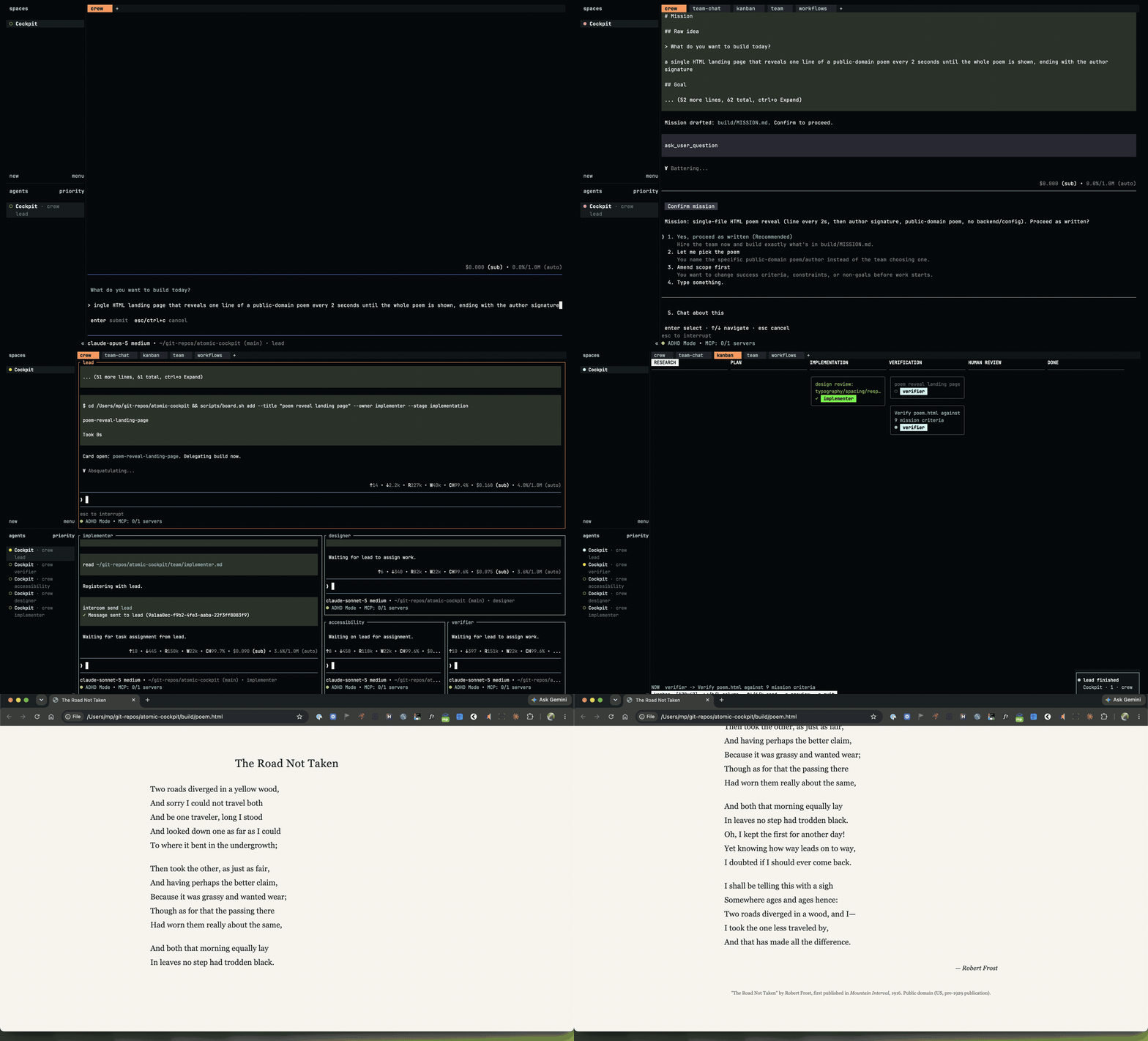
Not a drawing and not a re-creation: these are screenshots of the screen, taken every
two seconds while this actually happened on 16 August 2026. The run finished — all 9
checks passed, checked twice by an agent that did not write the code, then watched by a
person. It took fourteen minutes from approval to proof, and cost $1.98. It also turned up
a bug in one of the cockpit's own tabs. Every stage above is described in words, with
still pictures, in
the
case study.
Everything here is also published as a website:
mpaiva.github.io/atomic-cockpit.
The pages the agents built run there, so you can watch one instead of reading its HTML.
Before you start
You need three things:
A Mac. These steps are tested on macOS. They may not work on Windows or Linux.
A terminal app. This is a program where you type commands. The setup installs one
called Ghostty.
A Claude Pro or Max account. The agents use it to think. It costs money to run them.
This is not free. Each agent uses your Claude account while it works. A team of five
agents costs about five times as much as one. You can stop them at any time. See
How to stop.
Set up (you do this once)
Step 1: Get the project
Open your terminal app. Type this and press Return:
git clone https://github.com/mpaiva/atomic-cockpit
cd atomic-cockpit
You will see: lines of text about downloading files.
Step 2: Install the tools
Type this and press Return:
./scripts/setup.sh
You will see: a list of green check marks (✓). This can take a few minutes.
If you see a red ✗, the message tells you what to fix. Fix it, then run the command again.
Step 3: Log in
Type this and press Return:
atomic
A program opens. Type /login and press Return. Choose Claude Pro/Max. Follow the steps
in your web browser.
You will see: a message that says you are logged in.
To leave the program, hold Control and press C. Do this twice.
You are now set up. You will not need to do these three steps again.
Build something
You need two terminal windows for this. The first one runs the build. The second one is
where you answer questions.
Step 1: Start the build
In your first terminal window, type this and press Return:
./build.sh
You will see: a message telling you to open a second window. The first window then waits.
This is normal. Leave it open.
Tip — one command that knows what to do next. Instead of remembering flags, run
./cockpit.sh. It looks at what already exists (is a cockpit running? is there a mission in
build/? any archived runs?) and shows a short menu of only the sensible next steps — attach,
resume, start fresh (it archives build/ for you), show status, or stop. New here? ./build.sh
below is the plain path; ./cockpit.sh is the shortcut once you have runs to manage.
Step 2: Open the second window
Open a new terminal window. Type this and press Return:
herdr --session cockpit
You will see: a dark screen with a box in the middle. The box asks:
What do you want to build today?
Step 3: Answer the question
Type what you want to build. Use normal words. You do not need to be technical.
Good answers look like this:
a to do list app I can use with a keyboard only
a tool that turns a spreadsheet into a web page
a program that renames my photo files by date
Press Return when you are done.
You will see: the screen change while an agent writes your plan. This takes a minute or
two.
Step 4: Read the plan and say yes
The agent shows you a plan. It asks: Proceed as written?
Read the plan first. Look for:
Goal — what you will have at the end
Success criteria — how you will know it worked
Non-goals — what it will not build
If the plan looks right, choose yes.
If the plan looks wrong, say what to change. It is much cheaper to fix the plan now than to
fix the software later.
You will see: the screen split into boxes after you say yes. Each box is one agent.
Step 5: Watch the agents work
Each box has a name, like implementer or verifier. Under each name is a word that tells
you what that agent is doing:
Word
What it means
working
The agent is busy.
idle
The agent is waiting for work.
blocked
The agent needs you. Read that box.
done
The agent finished its task.
You do not need to read every box. Watch for the word blocked. That is the one that
needs you.
Your files are saved in a folder called build.
Watching an agent’s live workflow graph: if a box is running a named Atomic workflow
(the lead may hire specialists this way for bigger jobs), you can watch its stage-by-stage
progress. Click into that agent’s own box, then press F2, or type `/workflow connect
` and press Return. The run id appears in that agent's own on-screen output right
after it starts the workflow. This shows one agent's own graph, in its own box — it does
not appear anywhere else. See [herdr/atomic-integration.md](/atomic-cockpit/herdr/atomic-integration.html#watching-a-workflow-graph-today)
for the full recipe.
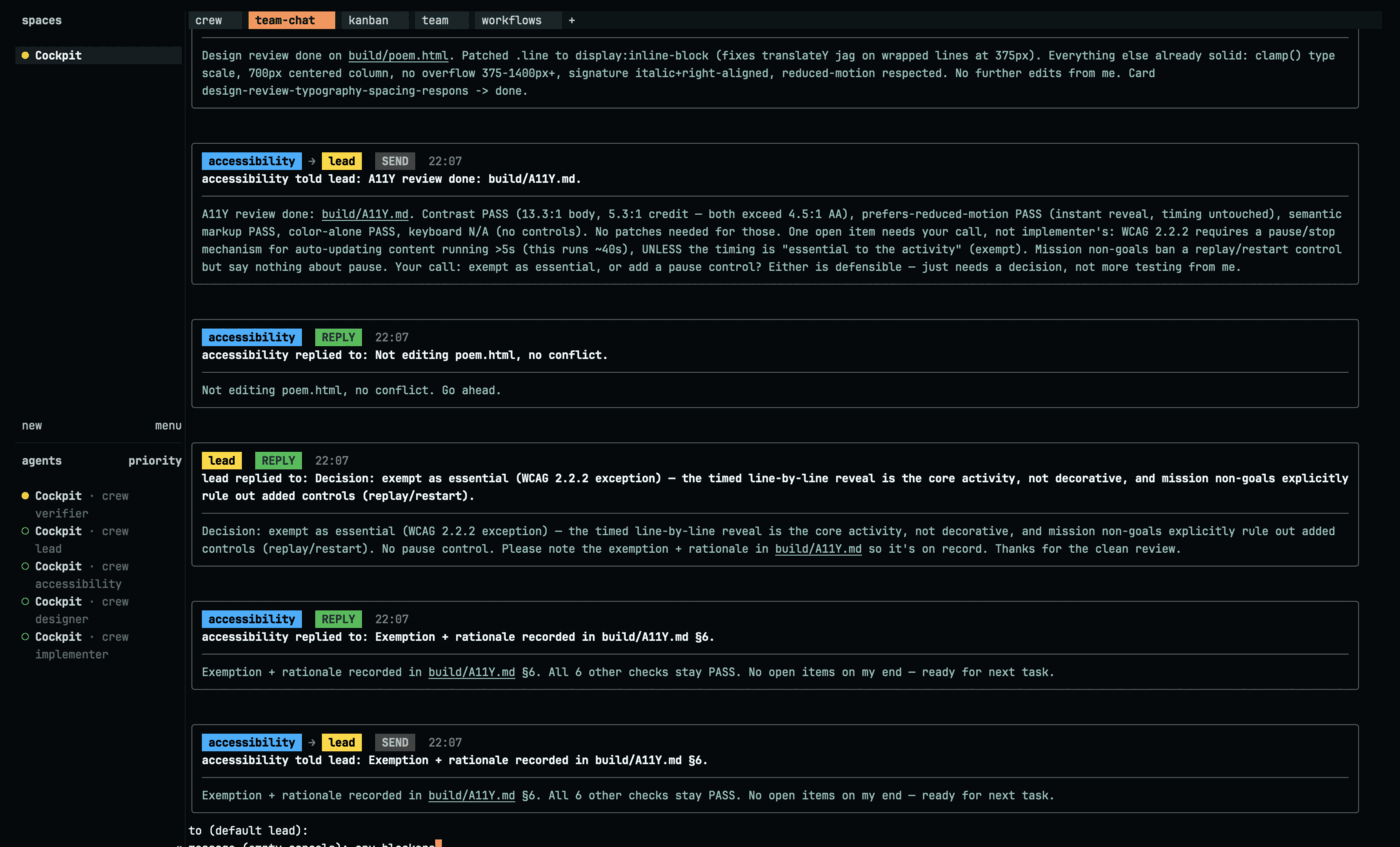
### The team chat tab
When the build starts, a Herdr tab called **team-chat** opens next to the tab holding the
agent boxes. It shows every message the agents send each other as one running conversation —
each in a box with the sender's name, the kind of message (SEND, ASK, REPLY), and the time.
The first sentence is bold so you can skim.
The team-chat tab from the run at the top of this page. The pink human
badge is a question typed into this pane with i during the run; the reply
came back into the same feed nine seconds later.
You can:
- **Scroll** with `j`/`k` or the arrow keys (`Space`/`b` for a page, `g`/`G` for top/bottom).
- **Send a message** to the team: press `i`, type who it is for (default `lead`), then your message.
It goes to that agent and appears here as one of the messages.
- **Preview a document** an agent mentions: press `p`, pick the file by number, and it opens
inside the pane (Markdown is rendered). Press `q` or `Esc` to go back.
- **Close** the viewer with `q`. Reopen it any time with `./scripts/team-chat.sh`.
The pane reflows cleanly when you resize the window or change the font size. Sending needs `bun`
or `node` on your machine. Note: messages you type into an agent's own popup are not shown here —
use `i` in this pane so the message is captured.
## How to stop
You can stop at any time. Type this in any terminal window and press Return:
```bash
herdr --session cockpit server stop
```
**You will see:** the agent boxes close. The agents stop. Nothing more is charged to your
account.
Your files stay in the `build` folder. Nothing you built is deleted.
## Run more than one build at once
You can run a second build next to the first. Give it a name with `--session`:
```bash
./build.sh --session beta
```
The two runs are kept completely apart. The named run gets:
- its own cockpit — open it with `herdr --session beta`
- its own files, in a folder called `build-beta` (not `build`)
- its own team, so the two teams never see or message each other
Your first run keeps using `build` and the name `cockpit`, and is not touched.
To manage the named run:
```bash
herdr --session beta # watch it
herdr --session beta server stop # stop only this one
cat build-beta/team-chat.log # its chat history
```
You can use any name in place of `beta`. Each name is a separate, isolated build.
## If something goes wrong
| What you see | What to do |
|--------------|------------|
| The second window is empty, with no question | Wait 30 seconds. The agent may still be starting. |
| "atomic has no usable credential" | You are not logged in. Do [Step 3: Log in](#step-3-log-in) again. |
| "herdr not found" or "atomic not found" | The setup did not finish. Run `./scripts/setup.sh` again. |
| "build/ already holds a run" | You have an unfinished build. Run `./cockpit.sh` and pick **Resume** to continue it, or **Start FRESH** to archive it and begin again. (By hand: `./build.sh --resume`, or rename the `build` folder then `./build.sh`.) |
| An agent stopped and you do not know why | Its notes are saved in `build/.launch/`. Each agent has a file ending in `.stderr.log`. |
| You want to start over completely | Run `./cockpit.sh` and choose **Start FRESH** — it archives `build/` and restarts for you. (By hand: run the stop command above, rename the `build` folder, then `./build.sh`.) |
| A pane looks stuck, or `build/BLOCKED.md` shows up | See [docs/troubleshooting.md](/atomic-cockpit/docs/troubleshooting.html) — stuck panes, unclear agent state, and how to read `BLOCKED.md`. |
## Words used in this project
| Word | What it means here |
|------|--------------------|
| Agent | An AI that does one job, like writing code or checking work. |
| Lead | The agent in charge. It writes the plan and starts the other agents. |
| Mission | The written plan, saved as `build/MISSION.md`. |
| Roster | The list of agents chosen for your job, saved as `build/ROSTER.md`. |
| Role | The job an agent does, such as `designer` or `verifier`. |
| Pane | One box on the screen. Each agent gets one. |
| Session | One run of the whole team. This one is named `cockpit`. |
| Gate | A point where the work stops and waits for your answer. |
## How it works
This project joins three tools that already exist. It does not replace them.
| Tool | What it does here |
|------|-------------------|
| [Ghostty](https://ghostty.org/) | The terminal app you type in. |
| [Herdr](https://herdr.dev/) | Shows each agent in its own box. Tells you what each one is doing. |
| [Atomic](https://github.com/bastani-inc/atomic) | Runs the agents. Keeps them to the plan. |
The agents send messages to each other while they work. They do not send every message
through you.
## Rules this project follows
1. **Ask before spending.** You approve the plan before any team starts.
2. **The writer does not grade its own work.** A separate agent checks it.
3. **Show proof, not promises.** "It works" is not enough. The proof is the command that was
run and what it printed.
4. **Only hire who is needed.** A small job gets a small team.
5. **Stop instead of guessing.** An agent that is stuck asks you. It does not invent an
answer.
6. **Write things down.** Agents share files, not memory.
## Learn more
These pages have more detail. They are written for people who want the full picture.
- [docs/getting-started.md](/atomic-cockpit/docs/getting-started.html) — setup, with every step spelled out
- [docs/troubleshooting.md](/atomic-cockpit/docs/troubleshooting.html) — intake timeouts, stuck panes, unclear agent state, reading `build/BLOCKED.md`
- [docs/case-study-road-not-taken.md](/atomic-cockpit/docs/case-study-road-not-taken.html) — a real run, screenshot by screenshot, including what broke
- [docs/architecture.md](/atomic-cockpit/docs/architecture.html) — how the three tools fit together
- [docs/monitoring-agents.md](/atomic-cockpit/docs/monitoring-agents.html) — how to watch a team without reading everything
- [docs/operating-model.md](/atomic-cockpit/docs/operating-model.html) — the mental shift: how to supervise instead of type
- [docs/kanban.md](/atomic-cockpit/docs/kanban.html) — the kanban board: columns are the workflow stages, cards are files under `build/BOARD/`
- [docs/verification-and-gates.md](/atomic-cockpit/docs/verification-and-gates.html) — how the work gets checked
- [docs/security.md](/atomic-cockpit/docs/security.html) — how to run this safely
- [team/ROLES.md](/atomic-cockpit/team/ROLES.html) — every agent role, and when it is used
- [specs/2026-08-14-intercom-team-chat-pane.md](/atomic-cockpit/specs/2026-08-14-intercom-team-chat-pane.html) — design of the team-chat pane (for contributors)
## What is finished and what is not
**A full build has worked, start to finish — twice, with a different sized team each time.**
The run this page shows was asked for on 16 August 2026: *"a single HTML landing page that
reveals one line of a public-domain poem every 2 seconds until the whole poem is shown, ending
with the author signature."* The lead hired **four** agents, because that mission put
presentation and readability in its checks. All 9 checks passed — checked twice by an agent
that did not write the code, before and after the last patches landed — and then watched by a
person. It took fourteen minutes from approval to sign-off, and cost $1.98 in total.
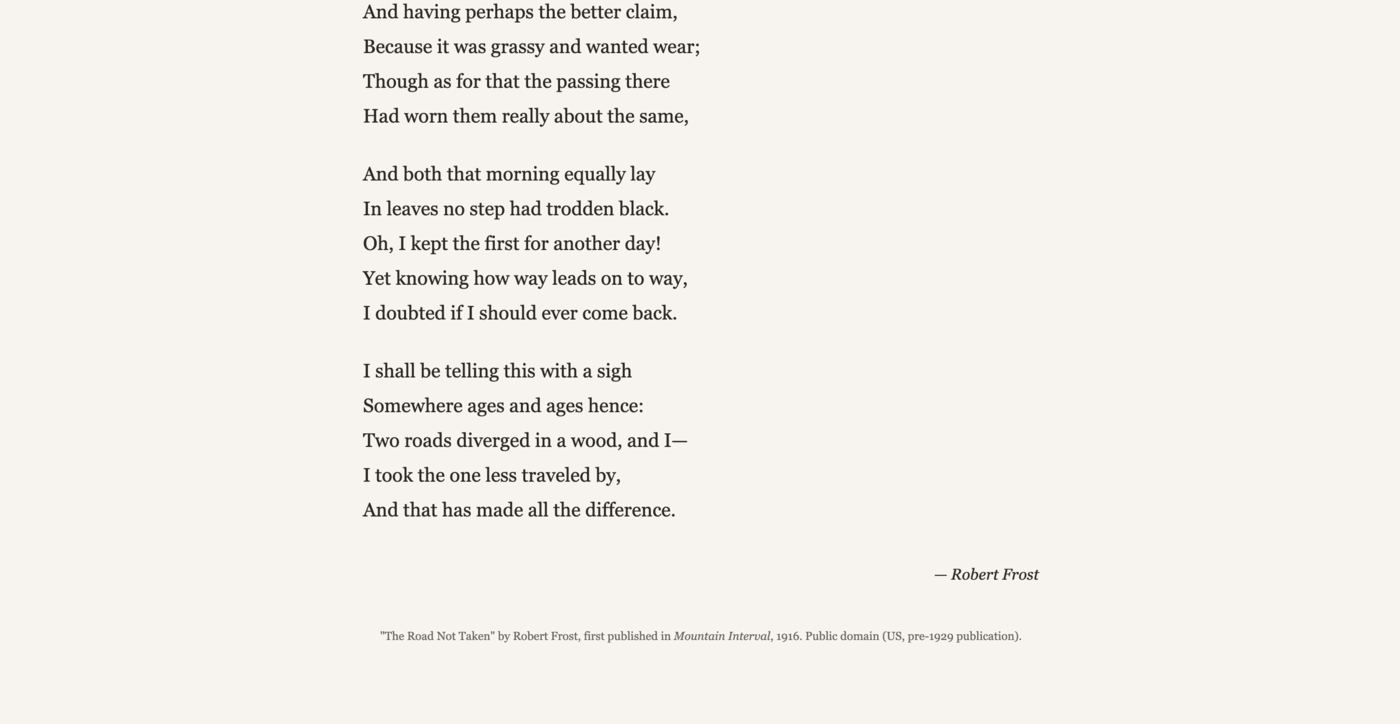
The page this run built, photographed from the screen the moment the reveal
finished and the timer stopped.
Watch
it run — it takes about forty seconds. The file itself is
docs/samples/road-not-taken.html, 4,238
bytes, exactly as the agents produced it.
That run is the picture at the top of this page, and it is written up screenshot by screenshot
in [docs/case-study-road-not-taken.md](/atomic-cockpit/docs/case-study-road-not-taken.html), including what went
wrong.
An earlier run finished too, for the same idea at one verse every 10 seconds. It hired **two**
agents rather than four — the same cockpit sizing the team to the job. Its page is kept at
[docs/samples/poem-page.html](/atomic-cockpit/docs/samples/poem-page.html).
**This works:**
- The question, the plan, and the approval step.
- Choosing a team that fits the job. A small job gets two agents. A bigger one gets more.
- Agents talking to each other while they work.
- Seeing what each agent is doing.
- Building real, working software and proving it works.
**Restarting a stopped build works:**
If a build stops before it is done, you can start it again:
```bash
./build.sh --resume
```
We tested this. We stopped a build on purpose, then started it again. The lead agent came
back, read the plan, and carried on. It did not ask the question again, and it did not make
you approve the plan a second time.
The test found three problems. All three are fixed.
**This is still rough:**
- The first two tries failed before any build worked. One deadlocked on its own readiness
check; the other had an unrelated Herdr plugin uninstall kill the running team. Both are
fixed.
- **`build.sh` used to stop waiting for your answer after ten minutes.** If you took longer
to answer the opening question, the script exited; the agent kept running with your
question on screen, but the two messages that get it moving never arrived, and `--resume`
was not a safe fix (it restarts the server and would throw away the answer you just typed).
It happened once for real, and needed a human to work around it mid-run. **Fixed, and now
proven:** the intake wait no longer has a cap. In the run pictured above the question sat
unanswered for **forty-three minutes** while `build.sh` printed a heartbeat every minute;
the answer was then typed normally and the build ran through to a verified finish. Nothing
was lost and nothing had to be worked around.
- We have not yet used `--resume` to finish a job that was left half done. Our test brought
back a job that was already complete. So restarting works. Picking up unfinished work is
not proven.
- Bigger jobs have not been finished yet. The largest job tried so far was stopped early.
Tested with Atomic 0.9.13, Herdr 0.8.0, and Ghostty 1.3.1.